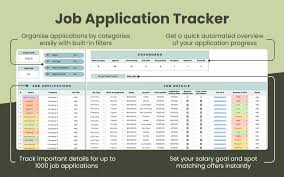
The Organization Hack
The Organization Hack: Use This Simple Spreadsheet to Track All Your Applications
Applying for scholarships, internships, grants, or university programs can feel overwhelming. Between deadlines, requirements, essays, and recommendation letters, it’s easy for something to slip through the cracks. Many students miss out on free money or life-changing opportunities—not because they’re unqualified, but because they’re unorganized.
But what if you could manage everything with one simple tool?
A single spreadsheet can save you hours, reduce stress, and dramatically increase your chances of success. This organizational strategy is simple, powerful, and used by high-achieving students around the world—and today, you’re going to learn exactly how to use it.
Welcome to The Organization Hack: a game-changing method that transforms chaos into clarity. excel-expense-spreadsheet
Why You Need a Tracking System (Even If You Think You Don’t)
Most people begin applying for opportunities with enthusiasm… and lose momentum fast.
Here’s why:
1. Too many deadlines
Some scholarships require submissions in two weeks, others in two months. Without tracking, you’ll miss the ones you qualify for.
2. Requirements vary
Some applications want:
-
Essays
-
Transcripts
-
CV or résumé
-
Letters of recommendation
-
Portfolio work
-
Financial documents
Failing to track these results in last-minute panic.
3. You forget what you’ve already applied to
After the 5th or 10th application, it becomes nearly impossible to remember:
-
Which essays you’ve used
-
What documents you submitted
-
Who your reference writer was
-
Whether you followed up
4. You waste time rewriting the same information
Without organization, you rewrite:
-
Similar essay prompts
-
Biography sections
-
Academic summaries
A spreadsheet eliminates repetition by keeping everything in one place.
5. Overwhelm leads to inconsistency
Success in applications depends on consistency. Organization keeps you motivated and on track.
The Simple Spreadsheet That Changes Everything
A single spreadsheet can manage ALL of your applications, including:
-
Scholarships
-
University applications
-
Internships
-
Fellowships
-
Study abroad programs
-
Research opportunities
-
Awards and competitions
-
Grants
-
Jobs
Unlike specialized apps or websites, a spreadsheet gives you:
-
Full control
-
Customization
-
Flexibility
-
Visibility
-
No subscription fees
-
No distractions
You can create the spreadsheet in:
-
Google Sheets (recommended)
-
Microsoft Excel
-
Notion tables
-
Apple Numbers
Google Sheets is best because it:
-
Updates automatically
-
Is accessible on any device
-
Allows color coding
-
Allows sharing with mentors or advisors
Let’s build the ultimate application-tracking spreadsheet step-by-step.
Step 1: Create the Main Columns
Your spreadsheet needs specific columns to capture everything important.
Here are the must-have columns:
1. Application Name
The name of the scholarship, internship, or program.
2. Organization/Institution
Which university, company, or foundation is offering it.
3. Type of Opportunity
For example:
-
Scholarship
-
Internship
-
Grant
-
Fellowship
-
Job
-
Competition
4. Website Link
Direct link to the application page.
5. Award Amount / Benefit
Examples:
-
$5,000
-
Full tuition
-
Paid research position
-
Summer internship
-
Travel stipend
6. Deadline
Use consistent date formatting (e.g., YYYY-MM-DD).
7. Application Status
Use simple categories such as:
-
Not Started
-
In Progress
-
Submitted
-
Accepted
-
Rejected
-
Pending
8. Required Documents
Include items such as:
-
Transcript
-
Personal statement
-
CV
-
Portfolio
-
Essay
9. Essay Prompt (If any)
Paste the exact prompt so you don’t constantly reopen the website.
10. Recommendation Letters Required
Yes/No, plus the name(s) of the recommender.
11. Notes
Any additional details:
-
Restrictions
-
Eligibility requirements
-
Application tips
-
Contact information
12. Results (Optional)
Outcome updates:
-
Awarded
-
Interview scheduled
-
On waitlist
Each column serves a specific purpose and keeps your application journey smooth and stress-free.
Step 2: Add Color-Coding for Quick Navigation
Color makes the spreadsheet easier to understand at a glance.
Here’s a simple but effective system:
-
Green → Submitted
-
Yellow → In progress
-
Red → Urgent or nearing deadline
-
Blue → Accepted
-
Gray → Rejected / Not eligible
You can set up automatic color rules using conditional formatting.
This way, your spreadsheet becomes a visual map of your progress.
Step 3: Use Filters to Sort Your Applications Instantly
Filters allow you to:
-
Sort by earliest deadline
-
Group all current tasks
-
Filter scholarships by award amount
-
View only opportunities you haven’t started
-
Organize by type (scholarship, internship, etc.)
Filters turn your spreadsheet into an efficient command center.
Step 4: Add a Task Checklist for Each Application
Large applications can feel overwhelming, so break them down into smaller tasks.
Create a separate tab called Tasks, with columns like:
-
Application Name
-
Task
-
Status
-
Due Date
Examples:
-
Request letter of recommendation
-
Write the essay
-
Edit the essay
-
Upload transcript
-
Complete online form
-
Submit application
Breaking tasks into pieces makes the process feel manageable.
Step 5: Build an Essay Bank
This is where you save HUGE amounts of time.
Create a second spreadsheet tab called Essay Bank.
Add columns:
-
Essay Prompt
-
Word Limit
-
Reusable? (Yes/No)
-
Application Name
-
Link to Essay
-
Date Written
Over time, you’ll collect:
-
Personal statements
-
“Why do you deserve this scholarship?” essays
-
Leadership essays
-
Community service essays
-
Career goals statements
This tab becomes your vault of ready-to-use content.
When a new scholarship asks a similar question, you reuse and adapt—not rewrite from scratch.
Step 6: Add a Recommender Tracker
Students often forget:
-
Who wrote which letter
-
When letters were submitted
-
If a recommender needs updates
-
Whether to send thank-you notes
Create one more tab called Recommender Tracker, including:
-
Recommender Name
-
Email
-
Phone Number
-
Relationship (Teacher, Coach, Supervisor, etc.)
-
Applications They’ve Submitted
-
Date You Requested Letter
-
Date Letter Was Submitted
-
Thank-You Sent? (Yes/No)
This keeps your relationships organized and ensures you remain respectful and professional.
Step 7: Add a Calendar Sync (Optional but Powerful)
Google Sheets allows you to connect your deadlines to Google Calendar.
This does two important things:
-
Sends reminders
-
Prevents missed deadlines
You can set reminders:
-
1 week before
-
3 days before
-
Same-day
This step alone significantly increases your completion rate.
How This Spreadsheet Helps You Win More Scholarships and Opportunities
1. You never miss a deadline
The number one reason students lose opportunities is simply missing the date.
2. You save time
Reusing essays and documents cuts hours off every application cycle.
3. You stay motivated
Seeing your progress visually encourages you to keep going.
4. You avoid repeating mistakes
Tracking results helps you learn which application types you perform best in.
5. You apply to more opportunities
More applications = more chances to win.
6. You stay professional
Having organized documents makes you look capable and responsible.
7. You reduce stress and overwhelm
Everything is structured and predictable instead of chaotic.
8. You build consistency
Success comes from consistent action—not random effort.
Who Should Use This Spreadsheet?
This method is perfect for:
-
High school students
-
University students
-
Graduate students
-
International students
-
Adult learners
-
Job seekers
-
Researchers
-
Artists
-
Entrepreneurs
-
Anyone applying for competitive opportunities
If you’re pursuing anything that requires an application, this tool works for you.
Bonus: Advanced Spreadsheet Features to Supercharge Your Organization
If you want to take your spreadsheet to the next level, try these:
✔ Automated countdown to deadlines
Use a formula like:=F2 - TODAY()
to show how many days remain for each application.
✔ Priority ranking
Add a “Priority” column (High, Medium, Low).
✔ Auto-generated progress bars
Use conditional formatting to create a visual progress bar.
✔ Document file links
Add links to your essays, PDFs, résumé, or portfolio inside the sheet.
✔ Award value calculator
Track total scholarship money you’ve applied for or won.
These features turn your spreadsheet into a professional-grade application management system.
Final Thoughts: Your Simple Spreadsheet Is Your Secret Weapon
Organization isn’t about being perfect—it’s about creating a system that works with you, not against you.
This simple spreadsheet:
-
Saves you time
-
Reduces stress
-
Helps you apply consistently
-
Prevents deadline disasters
-
Boosts your chances of winning scholarships and opportunities
-
Keeps your application journey efficient and manageable
The most successful students and professionals aren’t the smartest—they’re the most organized.
Start building your spreadsheet today, and you’ll immediately feel more in control of your application journey.